

Skip to content

DR Hub

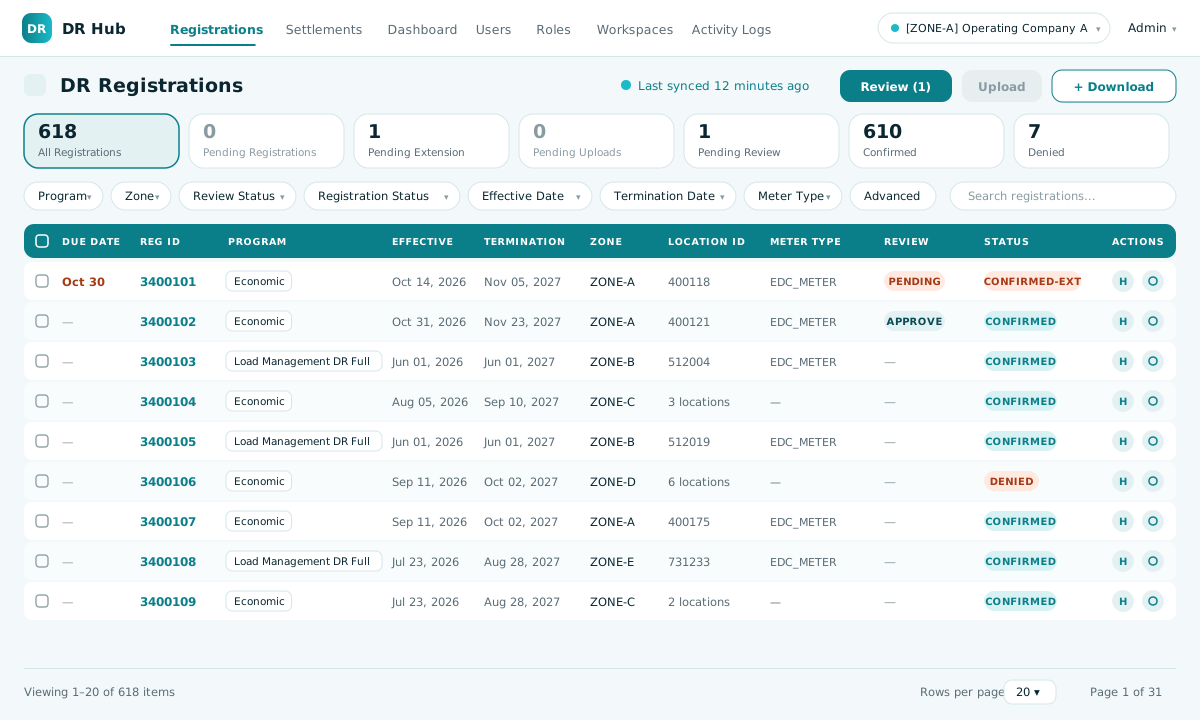
DR Hub registrations list
PJM demand response automation platform

Automate demand response:

When PJM calls demand response events, participants register through their CSP on PJM’s portal. DR Hub starts from those registrations: it downloads them by API, validates them automatically, lets your team review and control the outcome, and uploads the statuses back to PJM. The same cycle runs for settlements.

Built for: Utilities and market participants that validate PJM demand response registrations and settlements for one or many operating companies.

How it works

How DR Hub Works,
From PJM to Validated Upload

01
Network infrastructure representing the PJM data download

Download from PJM

Registrations, locations, extensions, settlements, claims and CBL data are downloaded from PJM by API for each company workspace.
PJM API integration
02
Source code representing automated validation

Validate automatically

Oracle stored procedures compare every item with the utility’s own records and mark it to accept or deny, in bulk.
Oracle stored procedures
03
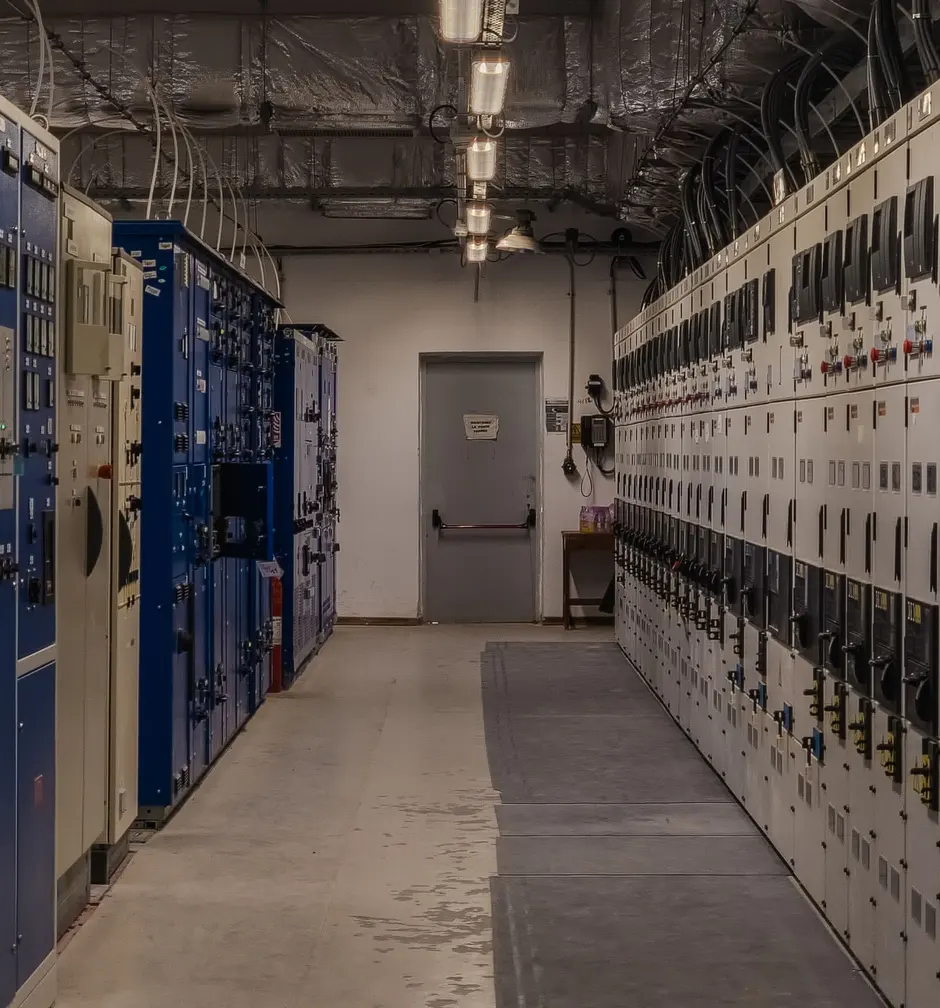
Control room screens representing review and upload

Review and upload

Reviewers work through selected or all records, approve or deny with comments, and the statuses upload back to PJM.
Audit-logged review
See every step run on your own data
Request a demo
Architecture

How DR Hub Automates the Review

The utility must validate every demand response registration and settlement that comes from PJM. DR Hub automates both reviews, from download to validated upload.
  1. 1PJM calls a DR eventPJM
  2. 2CSPs register customer sitesCSP
  3. 3Utility reviews registrationsAutomated by DR Hub
  4. 4Meter data is submittedCSP
  5. 5Utility validates settlementsAutomated by DR Hub
  6. 6PJM settles and paysPJM
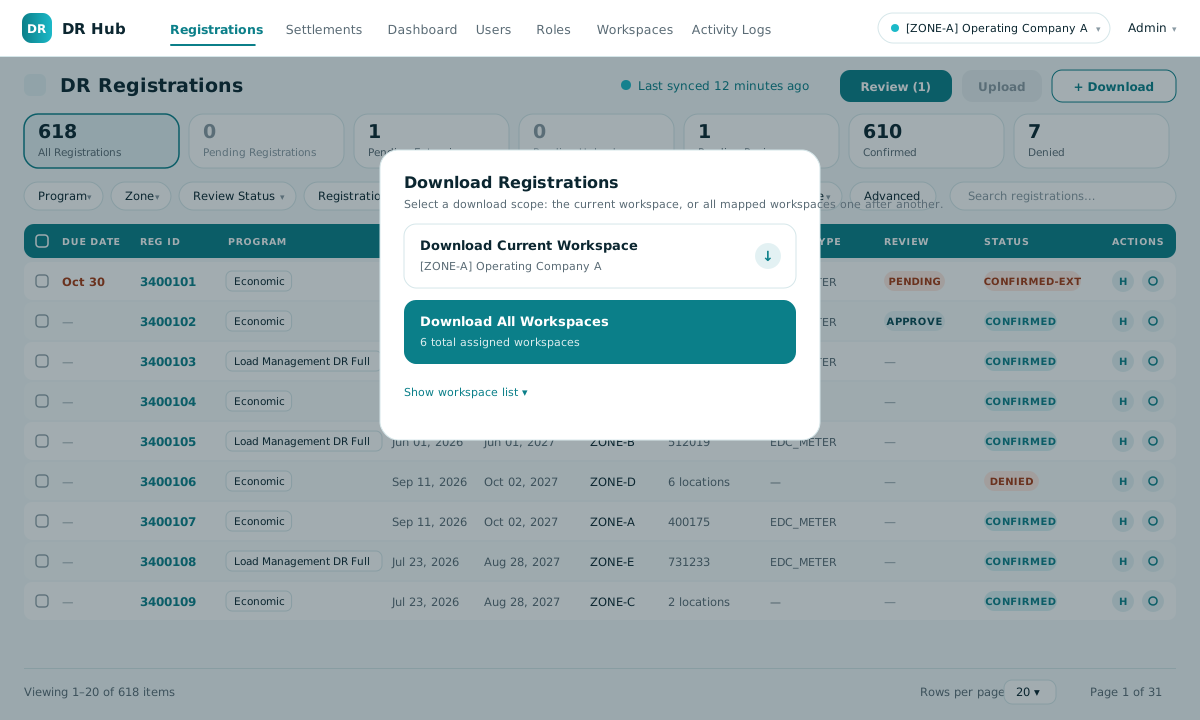
Registrations · DownloadIllustrative screen, sample data
Download Registrations dialog offering the current workspace or all workspaces

Choose one workspace or all mapped workspaces; they download one after another.

The manual way
  1. Log in to PJM, export the data
  2. Check it in spreadsheets against other systems
  3. Decide one record at a time, key it back

~10 min per registration · ~15 min per settlement claim

With DR Hub

500 settlement claims in about 10 min

Instead of over 100 hours of manual work. Figures from the published case study.

Secure and governed by design

Built for the controls an enterprise utility expects.
  • LDAP sign-in, role-based accessPermissions for every module and action.
  • SecureVault credentialsDatabase secrets fetched from the vault at runtime.
  • Tenant workspacesEach company’s data kept apart, or processed together.
  • Complete audit trailEvery action logged by user, module and time.
  • Oracle stored proceduresValidation and bulk operations run inside the database.
  • Soft deleteRecords are deactivated, never erased.
Product tour

See DR Hub at Work

From PJM download to validated upload, the interface your team works in.
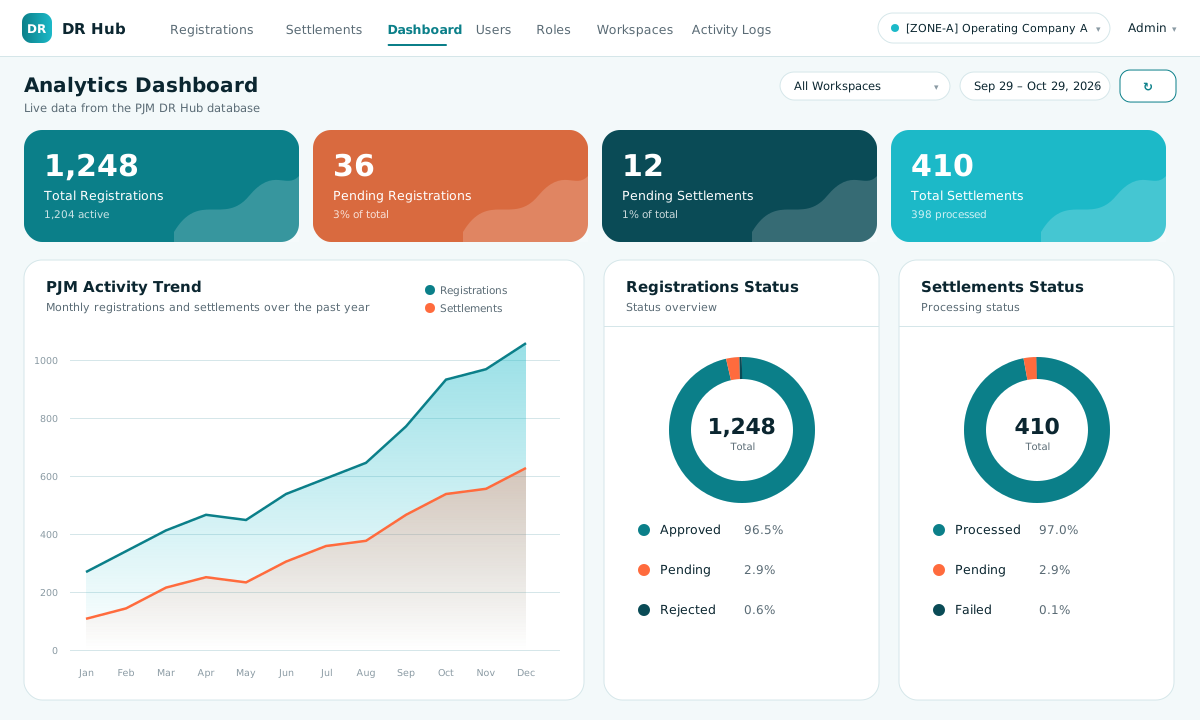
Analytics dashboard with registration and settlement trends

Dashboard

Totals, the monthly activity trend and the status mix for registrations and settlements, filtered by workspace and date range.

Illustrative screen drawn with sample data. DR Hub’s theme colours are configurable, so your installation can match your brand.
1 / 7
Two-way PJM integration: illustrative screen
Module 01

Two-way PJM integration

DR Hub does not register customers; that happens in PJM’s portal through CSPs. It connects to PJM by API to bring the data in, shows when each workspace last synced, and sends decisions back.
  • Downloads registrations, locations, extensions and EDC tasks
  • Downloads settlements, settlement info, claims data, CBL calculations and load data reviews
  • Uploads validated registration and settlement statuses back to PJM
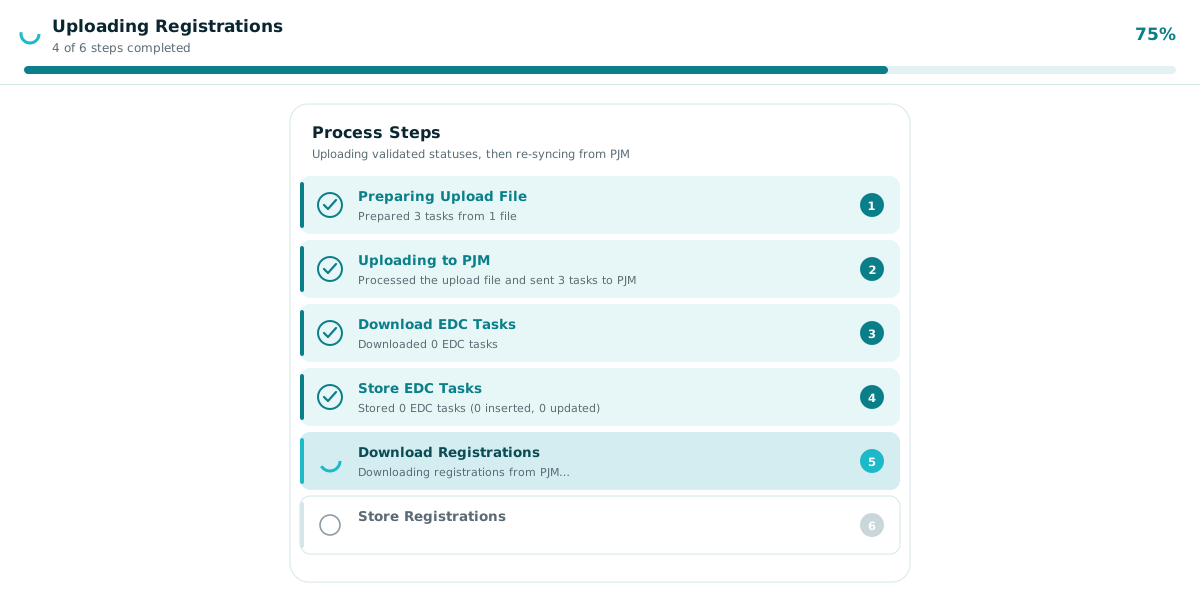
  • A step tracker shows each phase as it runs: prepare the file, upload to PJM, download and store EDC tasks, download and store registrations
  • Token authentication with client certificates, set per workspace (training and production)
Registrations: filter, review, upload: illustrative screen
Module 02

Registrations: filter, review, upload

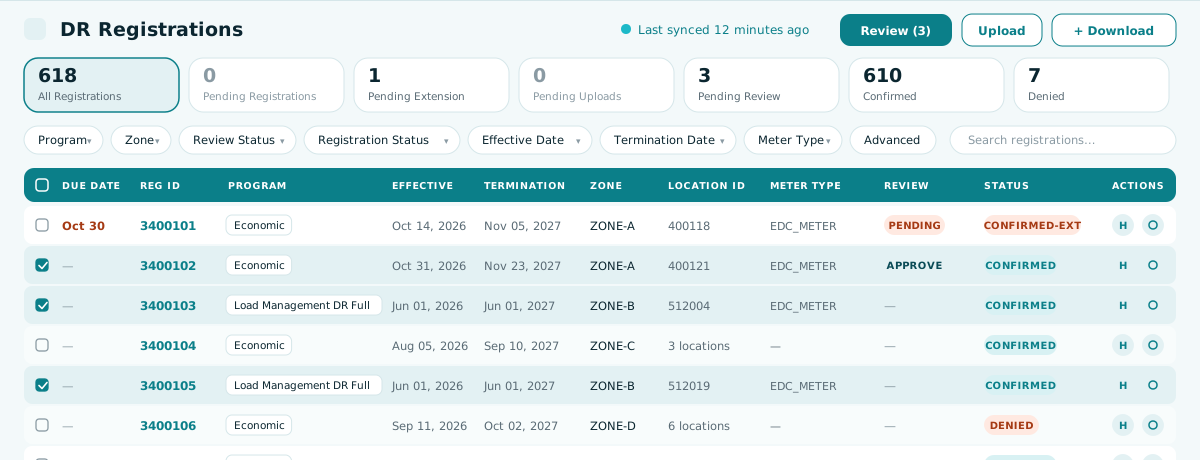
One list for every registration, with the review queue always one click away. You decide what is validated and what is sent.
  • Status filters: all, pending registrations, pending extension, pending uploads, pending review, confirmed and denied
  • Advanced filters by program, zone, meter type, pricing point, dates, location and account
  • Review and upload selected records or all of them, approve or deny with comments
  • Reviewed records move to the upload queue; after upload the list re-syncs from PJM and the counts update
  • Each registration shows its associated locations; soft delete keeps history
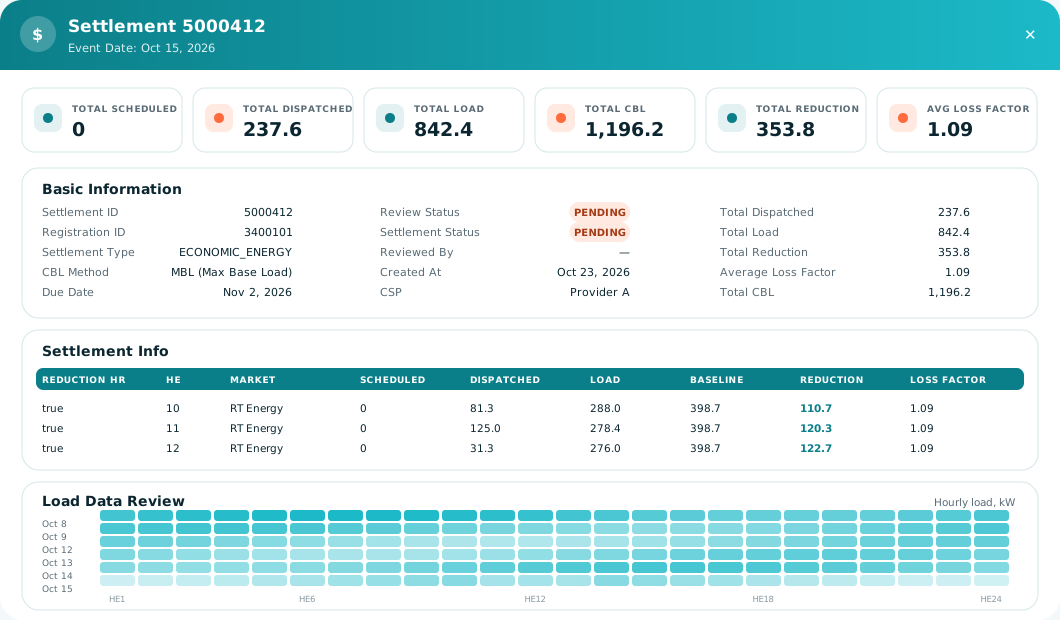
Settlement validation and upload: illustrative screen
Module 03

Settlement validation and upload

Settlements follow the same cycle: download, automated decision, controlled review, upload back to PJM. The detail view puts the numbers behind each claim in one place.
  • Totals for scheduled, dispatched, load, CBL, reduction and average loss factor
  • Reduction hours with market, baseline, reduction and loss factor
  • Hourly load data (HE1 to HE24) for the event and the days before
  • CBL method shown per settlement; decisions reviewed, overridden with comments, then uploaded
Demand response and DER dashboards: illustrative screen
Module 04

Demand response and DER dashboards

Operational analytics for the whole program, per company or combined, from the same data the reviewers work in.
  • Analytics dashboard: totals, activity trend and status mix, filtered by workspace and date range
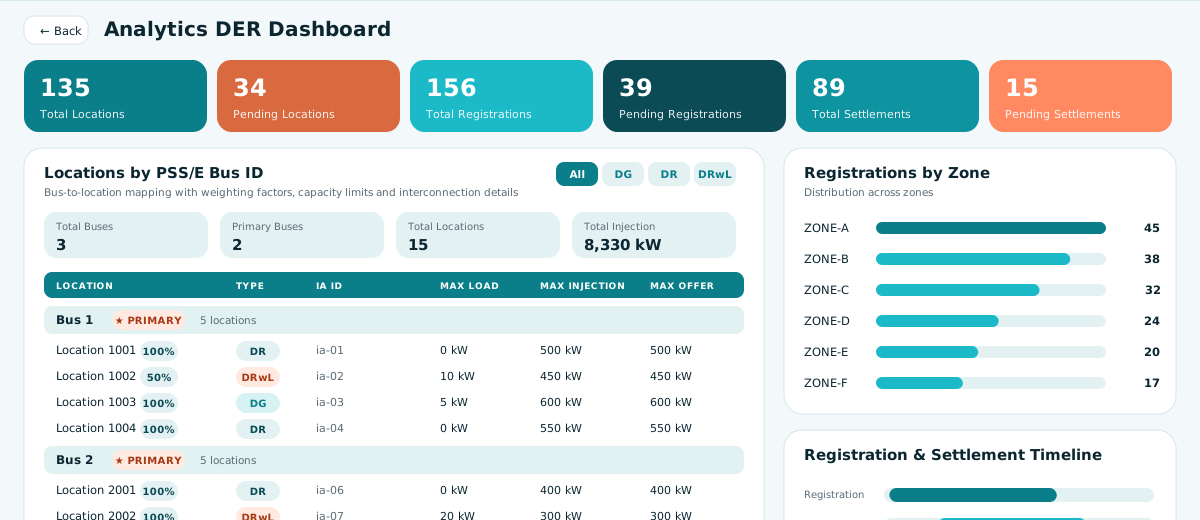
  • DER dashboard: locations mapped to PSS/E buses with weighting factors that must total 100%
  • Filter locations by type: DG, DR or DRwL, shown as a table or as charts
  • Zone distribution, registration and settlement timelines, double-counting and net metering warnings
Multi-tenant, company by company: illustrative screen
Module 05

Multi-tenant, company by company

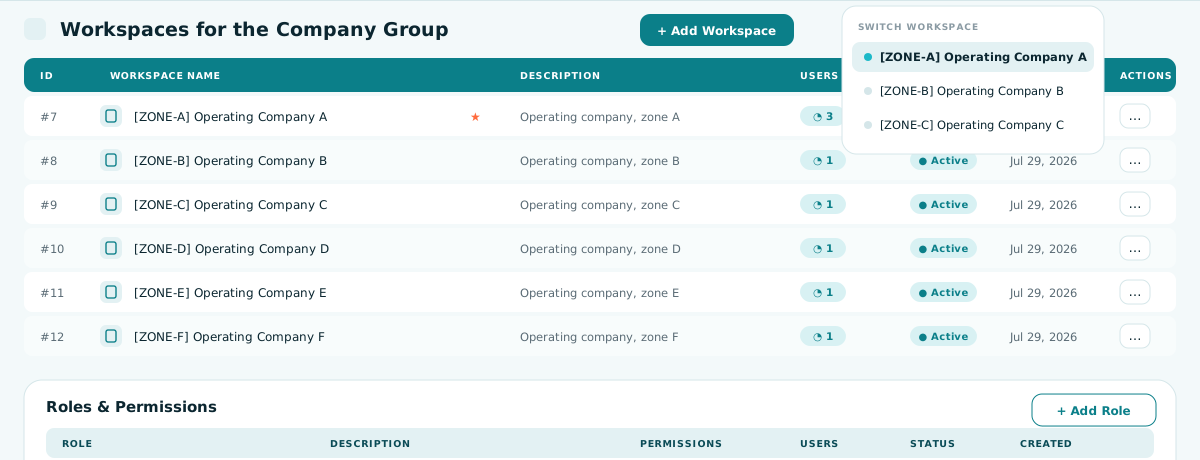
A tenant holds many workspaces, for example one per operating company of a utility group. Each company’s data stays separate and the workspace switcher is always in reach.
  • Process each company individually, or all together
  • Workspaces with their own users, status and PJM configuration
  • Tenant administrators and full role-based user management
  • Dashboards per company or combined
Security and audit by design: illustrative screen
Module 06

Security and audit by design

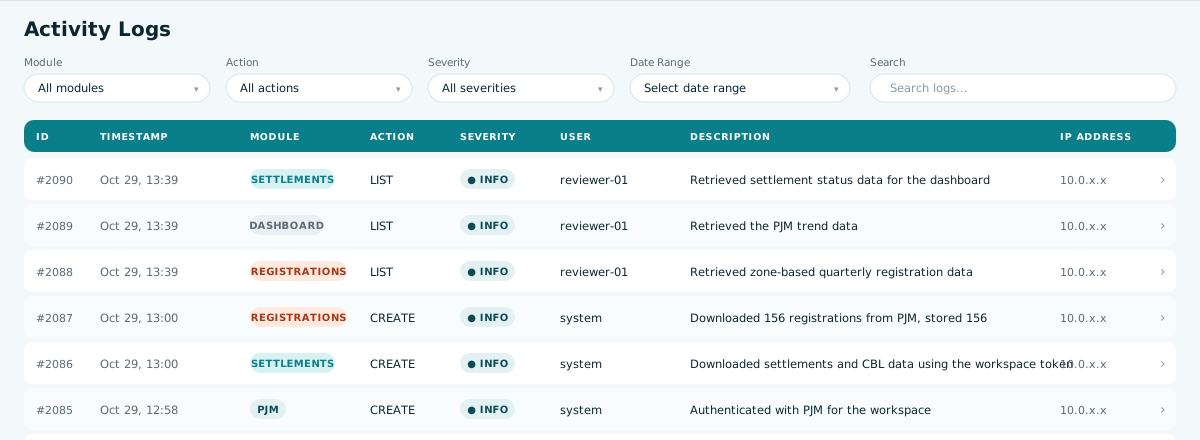
Built for regulated, enterprise environments, with every action on the record.
  • LDAP sign-in; JWT with secure sessions; security headers and rate limiting
  • Roles and permissions defined per tenant; each role shows its permission and user counts
  • Activity log of every action by module, action, severity, user and address, searchable by date
  • SecureVault credentials; an administrator API tester for diagnosing PJM, vault and directory connections
Case study · DR Hub Automation Tool

Delivering an Automated Solution for Managing PJM Demand Response Programs

A leading electric and natural gas utility in the northeastern US and member of the PJM Interconnection

PJM DR Hub Case StudyPDF · 488 KB · Rubicon Associates
~10 minSingle registration, manual
~15 minSingle settlement claim, manual

The brief

The utility’s team of experts manages operations involving wholesale billing, credit, and settlement to enable electric deregulation and to support energy efficiency programs.

PJM’s demand response (DR) program lets providers offer end-use customers the ability to reduce their usage in exchange for compensation from PJM’s wholesale markets. Participating providers must meet certain requirements to qualify for wholesale payments.

The utility’s team validates PJM DR program registrations and settlements in its zone through PJM’s DR Hub, and had used a third-party vendor to perform the tasks manually. After an assessment, the team determined that an automated tool managed in-house was essential and engaged Rubicon Associates to develop it.

The manual process

  1. Requires manual login, download, and review of PJM tasks
  2. For each task, further searches in PJM are needed to retrieve data
  3. Requires complex spreadsheets with external links and macros
  4. Long-running queries are needed to obtain verification data and comparison
  5. Decisions and status for each task need to be tracked manually

With the DR Hub Automation Tool

  • Automatically retrieves and compares DR registrations and claims data from PJM’s and the utility’s systems
  • Provides results in a GUI as well as batch files indicating whether each registration and claim should be accepted or denied
  • Maintains auditability for the assessments and a comprehensive, time-based process log for user and system activities
  • Allows for user access and role-based authorization management

What the utility set out to do

  1. 01Improve business processes and increase efficiency through automation
  2. 02Build an in-house, long-term scalable solution that provides more transparency in the overall process
  3. 03Leverage existing hardware and technology used by the utility’s other production systems
  4. 04Modernize, streamline, and simplify the solution, including integration with the utility’s and PJM’s systems

What the utility gained

  • Removed dependency on a third party and eliminated associated costs
  • Significant reduction in overall process time
  • Improved accuracy and less error-prone due to automation
  • Enhanced visibility and accountability
  • Reduced the need for manual querying of data and troubleshooting

Want the objectives, approach and results in full?
FAQ

DR Hub Tool

  • What does automated validation replace?
    The manual work of checking each registration and settlement against many details held in different places. The checks now run as programmatic logic inside Oracle stored procedures.
Engineers reviewing project plans on a laptop
Book a demo

See DR Hub Running on Your Own Process

Book a call and we will walk through download, review and upload with the people who built it. Need something similar? Rubicon pairs PJM, ISO/RTO and utility experts with the Rubicon Development Center’s engineers to design, build, validate and support applications for your market process.
  • Live walkthrough of the full cycle
  • Security, audit and multi-tenant model
  • Scoping for your PJM zones and companies
Contact us

Let’s Start the Conversation About Your Energy Initiative

Industrial control room with electrical panels